
QB-DataExporter1.3 - Download
You'll be able to download in few seconds.
Publisher Description
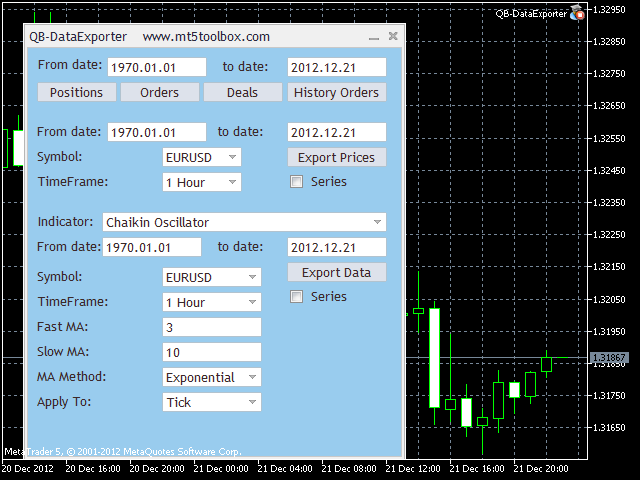
QB-DataExporter is tool that help traders to export data and indicators.
This tool can export Forex quotes and data about most commonly used indicators. The export is in .csv format. This tool is very useful because the .csv files can be easily imported in electronic trading platforms or in other applications, such as Microsoft Excel.
QB-DataExporter offers you the possibility to export Forex quotes for the preferred symbol starting from 1 minute timeframe and reaching at 1 month timeframe. This tool also offers you 33 indicators grouped in four categories: Trend , Oscillators, Volume, and Bill Williams\'. Using QB-DataExporter you can export all your trading activity: Positions, Orders, Deals, Orders History.
QB-DataExporter offers you the possibility to select exactly the time interval you wish. Data is sorted by the timestamp, in an ascending or descending order, your choice.
Data is offered with standard parameters, but the tool allows you to modify them in regard to your necessities. Having this king of information every trader builds new trading strategies.
I recommend you to export data with Data exporter because utilizing specific programs you can analyze specific trading strategies and increase their efficiency in time.
About QB-DataExporter
This Accounting & Finance program is available in English. It was last updated on 26 April, 2015. QB-DataExporter is compatible with the following operating systems: Windows.
The company that develops QB-DataExporter is Qubbit. The latest version released by its developer is 1.3.
The download we have available for QB-DataExporter has a file size of 793.6 KB. Just click the green Download button above to start the downloading process. The program is listed on our website since 2013-04-16 and was downloaded 0 times. We have already checked if the download link is safe, however for your own protection we recommend that you scan the downloaded software with your antivirus. Your antivirus may detect the QB-DataExporter as malware if the download link is broken.
How to install QB-DataExporter on your Windows device:
- Click on the Download button on our website. This will start the download from the website of the developer.
- Once the QB-DataExporter is downloaded click on it to start the setup process (assuming you are on a desktop computer).
- When the installation is finished you should be able to see and run the program.
Program Details
System requirements
Download information
Pricing
Version History
version 1.3
posted on 2013-04-16
Version 1.3
(F) Add the posibility to export you own trade history
Version 1.2
(F) We have modify the tool so you can export data in a specific time interval
(F) You can export the data using ascending time or descending time
Disclaimer
External Download
We do not host QB-DataExporter on our servers. We did not scan it for viruses, adware, spyware or other type of malware. This app is hosted by the software publisher and passed their terms and conditions to be listed there. We recommend caution when installing it.
The external download link for QB-DataExporter is provided to you by apps112.com without any warranties, representations or guarantees of any kind, so access it at your own risk.
If you have questions regarding this particular app contact the publisher directly. For questions about the functionalities of apps112.com contact us.
